
Migrating (CMaaS) to Stackit
Transfer Migrations to Stackit operate in the same way Transfer Replicas do and thus entail the same requirements and steps described below.
Replicating (DRaaS) to Stackit
Replica executions:
Steps performed by Coriolis:
- if this is the first replica execution for the VM, create empty Stackit volumes on the destination side, each matching the specifications of a disk the VM had on the source.
If this is a later replica execution, the previously created Stackit volumes are used - if this is the first replica execution of the VM, create a new live snapshot of the disks of the VM on the source cloud (handled by whatever source cloud plugin we are using).
If this is a later replica execution, create a new live snapshot based on the one from the last successful replica execution - create a temporary Linux worker VM (the “disk copy worker”) on the destination side and attach the Stackit volumes from Step 1 to it
- read the contents of the snapshot created at step 2 via the source platform’s snapshot/backup APIs (handled by whatever source cloud plugin we are using), transferring the written chunks to the temporary VM created in step 3, which then writes the chunks at the appropriate index/offset of the disks created at step 1
- once the contents of all the disks have been synced to the Stackit volumes created in Step 1, detach the Stackit volumes and delete the disk copy worker created in Step 3
Replica deployments:
Steps performed by Coriolis:
- create snapshots of the replicated Stackit volumes on the destination side to be able to roll back any changes. By default, new volumes are created from these snapshots, leaving the original replica volumes intact for future replica executions
- depending on the OS of the VM whose replica is being deployed, boot a temporary worker VM (“the OSMorphing worker”) with the same OS type on the destination cloud, and attach the Stackit volumes from step 1 to it
- perform the “OSMorphing process”, where Coriolis commands the OSMorphing worker created in step 2 to scan all attached disks for the OS installation of the VM we are migrating, mount, and perform the steps needed to prepare the installation for the Stackit platform (ex: uninstalling the VMWare guest tools and installing VirtIO drivers as well as the Stackit agent)
- detach the Stackit volumes created at step 1 from the OSMorphing worker created at step 2 and delete the temporary worker VM
- create and boot the migrated VM on the destination cloud with the specifications of the original VM on the source cloud (which have been noted during the particular replica execution we are deploying), creating and attaching any necessary NICs and Stackit volumes.
Configuration Options
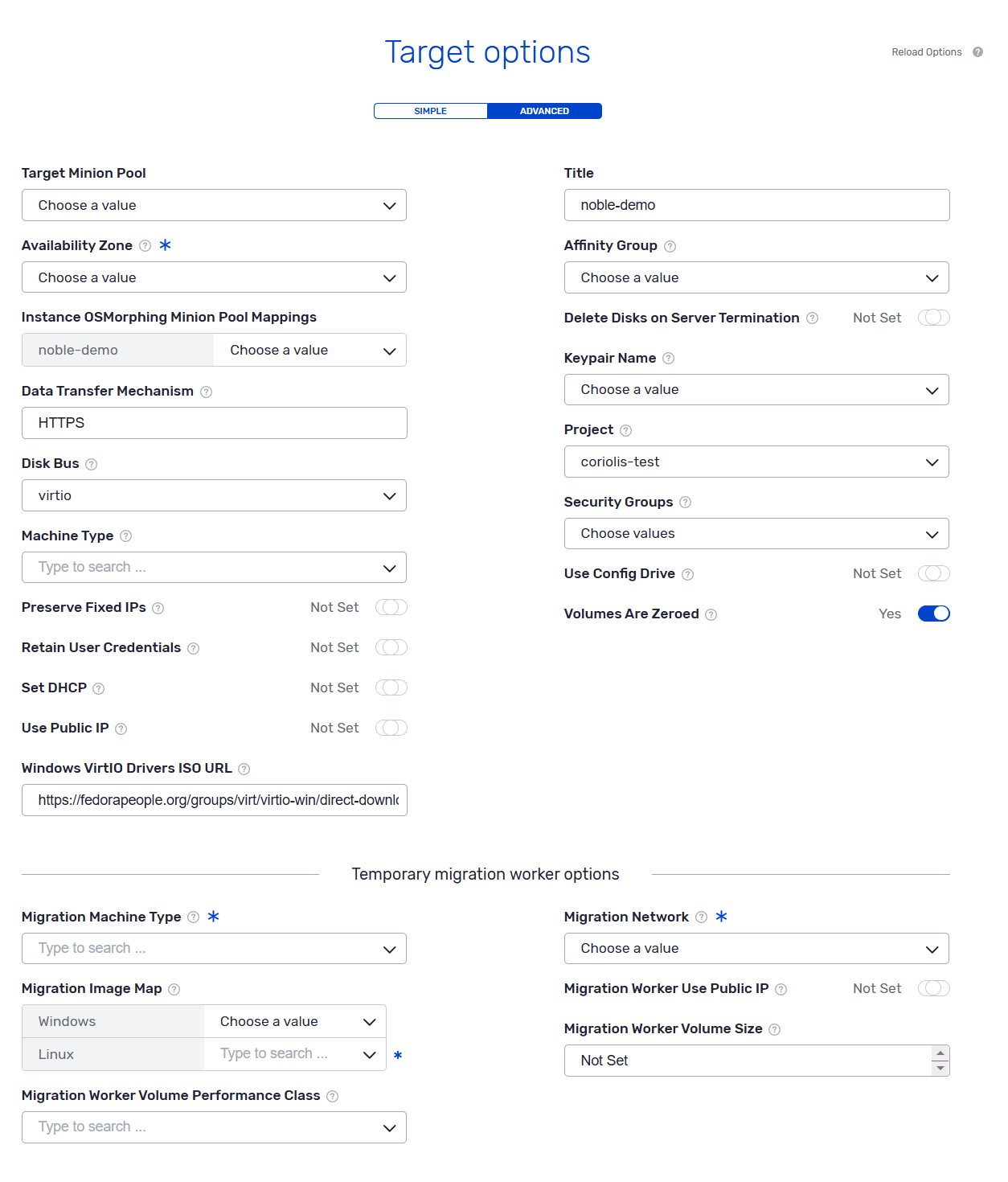
Advanced Target options for Stackit target destination
When migrating or replicating instances to Stackit, the user must specify which images to use for Linux and Windows temporary migration workers. We recommend using the public Stackit images.
The worker image OS version must be the same as or newer than the migrated instance.
NOTE! When Replicating/Migrating a Windows VM, both Linux and Windows images have to be specified, as Disk transferring is performed using the Linux template and OSMorphing is performed using the Windows template.
OSMorphing steps taken when migrating/replicating to Stackit
The following notable steps will be performed as part of the OSMorphing process:
Linux:
- installing cloud-init
- rebuilding initrd to add the virtIO drivers
Windows:
- installing cloudbase-init and enabling cloudbase-init service
- installing the VirtIO drivers
In addition to that, the Stackit agent will be installed.
Network configuration for the migrated VMs
When migrating instances to Stackit, users can specify which network to use for each individual NIC. The following parameters can be used to further customise the VM network configuration.
Preserve fixed IPs
If enabled, the Stackit NIC will use the same fixed (private) IP as the source NICs. An error will be raised if the source IP address is not in the range of the specified Stackit network.
If disabled, Stackit will pick a random address from the given network.
Note that Stackit does not currently support IPv6 networks, as such any IPv6 addresses will be dropped.
Use public IP
If enabled, the first NIC will receive a public IP selected by Stackit.
Set DHCP
This setting determines how the guest network interfaces will be configured during OS morphing.
It’s enabled by default and as a result Coriolis will configure each interface to use DHCP. Since all Stackit networks provide DHCP, we recommend leaving this setting on. This also ensures that the correct MTU and routes will be applied.
If disabled, Coriolis expects the guest to have static network configuration. Depending on the guest operating system, the following steps will be taken:
Linux:
- disable cloud-init network configuration
- set udev rules to preserve the interface names
- the MAC addresses cannot be preserved, existing configuration files must not contain explicit MAC filters
Windows
- define static network configuration through a script that will be invoked by cloudbase-init during the first replica boot
Configuration options for Stackit as a destination
Below is a listing of the configuration section needed when migrating/replicating to Stackit:
Stackit destination environment parameters
The destination environment parameters are a set of destination-cloud-specific parameters that offer additional options to the migration/replication process on a per-VM basis.
Below is a listing of the destination environment parameters the Stackit plugin supports when migrating/replicating a VM to Stackit:
|
1 2 3 4 5 6 7 8 9 10 11 12 13 14 15 16 17 18 19 20 21 22 23 24 25 26 27 28 29 30 31 32 33 34 35 36 37 38 39 40 41 42 43 44 45 46 47 48 49 50 51 52 53 54 55 56 57 58 59 60 61 62 63 64 65 66 67 68 69 70 71 72 73 74 75 76 77 78 79 80 81 82 83 84 85 86 87 88 89 90 91 92 93 94 95 96 97 98 99 100 101 102 103 104 105 106 107 108 109 110 111 112 113 114 115 116 117 118 119 120 121 122 123 124 125 126 127 128 129 130 131 132 133 134 135 136 137 138 139 140 141 142 143 144 145 146 147 148 149 150 151 152 |
[crayon-6aac5fe1b1b68033318424 inline="true" ][stackit_migration_provider] ### Import parameters # If enabled, all public Stackit images will be listed, including # previous builds of the same OS (e.g. having more than 10 builds for # Windows Server 2025). This can slow down user dialogs significantly, # having to retrieve more than 2000 images. (boolean value) list_all_images = false # Configure volumes to be deleted on an eventual termination of the # migrated server. Only applies to the boot volume. (boolean value) delete_disks_on_server_termination = false # Sets whether or not to configure the server to use DHCP during the # OSMorphing stage. (boolean value) set_dhcp = true # Whether or not unallocated blocks on target volumes contain zeros. # (boolean value) volumes_are_zeroed = true # Name of the volume performance class to be used for volumes with # unspecified storage backing option from the source or which could # not be mapped in the "storage_mappings". Default is "" (Stackit will # use the default volume performance class) (string value) default_volume_performance_class = # List of names or IDs of pre-existing security groups on the # destination Stackit project/region to be applied to the migrated # server. This set will be joined with the list specified via the # "security groups" parameter from the set of destination environment. # (list value) default_security_groups = # Mapping between guest OS types ('linux' or 'windows') and the names # or IDs of pre-existing images on the destination Stackit to be used # for temporary worker servers on the destination. The images must be # available to the project provided in the Coriolis Endpoint. The # images must have a standard initialization agent ('cloud-init' for # Linux, or 'Cloudbase-init' for Windows) installed and configured for # first boot. (dict value) migr_image_map = # Name of an existing machine type which to boot the temporary disk # copy/OSMorphing worker servers as. (string value) migr_machine_type = <None> # Name or ID of an existing network on the destination Stackit # project/region where to attach the NIC of the temporary disk # copy/OSMorphing worker servers. If "migr_worker_use_public_ip" is # set to 'false', the Coriolis installation must be able to route to # addresses allocated from this network. (string value) migr_network = <None> # Whether or not to allocate public IPs for the temporary disk # copy/OSMorphing worker servers. (boolean value) migr_worker_use_public_ip = true # A base64 encoded SSH public key that will be added to the migration # worker for debugging purposes. (string value) migr_worker_debug_ssh_public_key = <None> # The integer size (in GBs) of the volume to boot temporary worker # servers from. If not set, Coriolis will select the size based on the # minimum size reported by the image or the selected # "migr_machine_type". (integer value) # Minimum value: 1 migr_worker_volume_size = <None> # List of comma-separated labels to be set on the migrated servers. # (list value) server_labels = # Dictionary with arbitrary key-value pairs to set as the migrated # server's properties. (dict value) server_properties = # Whether or not to preserve the fixed (private) IPs of the migrated # servers' NICs. When this is set to 'true', the target Stackit cloud # will attempt to create NICs containing fixed IPs collected from the # source server. (boolean value) preserve_fixed_ips = false # Whether or not to attach a public IP to the already migrated server. # This option must be set to 'true' if the migrated server is intended # to have a public IP attached. (boolean value) use_public_ip = false # Name or ID of the affinity group to use when recreating the final # servers on Stackit. (string value) affinity_group = <None> # Name of the volume performance class to use when creating temporary # worker volumes. (string value) migr_worker_volume_performance_class = <None> # What mechanism to use when sending disk data from the Coriolis # installation to the temporary servers on the target Stackit to be # written to their respective disk. The HTTPS-based transfer mechanism # (TCP/5566) is faster but might not work if there are firewalls in # the way. The SSH-based transfer mechanism (TCP/22) is more costly # but will be allowed by most firewalls since SSH access from the # Coriolis installation to the temporary worker server is always # required. Coriolis automatically sets security groups rules for the # temporary servers accordingly. Default is HTTPS. (string value) # Possible values: # SSH - <No description provided> # HTTPS - <No description provided> data_transfer_mechanism = HTTPS # Name of the availability zone to where resources like servers and # volumes are assigned to. (string value) availability_zone = <None> # A dict of arbitrary key-value pairs to be added as volume image # config to the boot volume(s) of the final migrated server. Coriolis # automatically sets the 'operating_system', 'uefi', and 'secure_boot' # keys as part of the migration process, but they too can be # overridden using this option. These options will get overridden by # any options specified in the target_environment. (dict value) default_custom_boot_volume_image_metadata = # Whether or not Coriolis should reconfigure cloud-init during # OSMorphing to prevent it from creating a new system user or # disabling the root user and other existing users, including by # disabling password-based SSH authentication, or locking the user by # changing/removing its password completely. This will also prevent # cloud-init from adding SSH keypairs as authorized by the # "keypair_name" option. (boolean value) retain_user_credentials = false # URL to a .iso file containing the Windows VirtIO drivers to be # injected within Windows servers being migrated to Stackit. The URL # must be accessible from the OSMorphing worker server which will be # deployed on Stackit. (string value) windows_virtio_iso_url = https://fedorapeople.org/groups/virt/virtio-win/direct-downloads/stable-virtio/virtio-win.iso # Disk bus to be used for migrated server's volumes. (string value) # Possible values: # scsi - <No description provided> # virtio - <No description provided> # ide - <No description provided> # usb - <No description provided> disk_bus = virtio # Whether or not use config drive to send metadata to the migrated # server. Default is false. (boolean value) use_config_drive = false # Location of the Cloudbase-Init ZIP for amd64 systems (string value) cloudbaseinit_x64_url = https://www.cloudbase.it/downloads/CloudbaseInitSetup_x64.zip |
Example of destination environment JSON to be passed to the Stackit plugin
|
1 2 3 4 5 6 7 8 9 10 11 12 13 14 15 16 17 18 19 20 21 22 23 24 25 26 27 28 29 30 31 32 33 34 35 36 37 38 |
[crayon-6aac5fe1b1b6c434267624 inline="true" ]{ "network_map": { "source network name": "name or ID of existing network in destination Stackit" }, "storage_mappings": { "default": "storage_premium_perf2", "backend_mappings": [{"source": "datastor1", "destination": "storage_premium_perf4"}], "disk_mappings": [{"disk_id": "3000", "destination": "storage_premium_perf6"}] }, "machine_type": "g1.2", "project": "dest-stackit-project", "keypair_name": "new-key", "delete_disks_on_server_termination": false, "security_groups": ["security-group0", "security-group1"], "affinity_group": "name or ID of affinity group", "availability_zone": "eu01-1", "server_labels": ["env=prod", "migrated-by-coriolis"], "server_properties": {}, "use_public_ip": true, "disk_bus": "virtio", "use_config_drive": false, "custom_boot_volume_image_metadata": {}, "migr_image_map": { "linux": "Linux migration worker image name/ID", "windows": "Windows migration worker image name/ID" }, "migr_network": "stackit-network", "migr_machine_type": "g1.2", "migr_worker_use_public_ip": true, "migr_worker_volume_size": 10, "migr_worker_volume_performance_class": "storage_premium_perf2", "preserve_fixed_ips": true, "volumes_are_zeroed": true, "data_transfer_mechanism": "HTTPS", "set_dhcp": true, "retain_user_credentials": false, "windows_virtio_iso_url": "https://fedorapeople.org/groups/virt/virtio-win/direct-downloads/stable-virtio/virtio-win.iso" } |
Each parameter represents:
- network_map (string–string mapping, required) — mapping between source network identifiers and names or IDs of existing networks on destination STACKIT. For each NIC of the source server, Coriolis creates a NIC on the mapped destination network.
- storage_mappings (object) — how to map each source disk or storage backend to a STACKIT volume performance class. The mapping is expected to contain one or more of the following keys: default, backend_mappings, and disk_mappings. If omitted or empty, STACKIT picks the default performance class. Unmapped disks can also fall back to the plugin’s default_volume_performance_class config option.
- machine_type (string) — name of an existing STACKIT machine type for the migrated server. If omitted, Coriolis picks the smallest type that satisfies the source CPU/RAM. Windows guests need an explicit Windows-compatible type.
- project (string) — ID of the Stackit project in which to create the migrated resources (VM, volumes, NICs). If unset, the project of the service account from the Coriolis endpoint is used. This option applies to the created migration minions as well.
- keypair_name (string) — name of a keypair available to the Coriolis endpoint user, injected into the migrated server via metadata. Has no effect if retain_user_credentials is true (cloud-init will not add that key).
- delete_disks_on_server_termination (boolean, default false) — whether the boot volume is deleted when the migrated server is terminated. Applies only to the boot volume.
- security_groups (list of strings) — names or IDs of existing security groups in the same project as the Coriolis endpoint, applied to the migrated server. Joined with the plugin’s default_security_groups config option.
- affinity_group (string) — name or ID of an affinity group for the final migrated server.
- availability_zone (string, required) — availability zone for servers and volumes, including temporary disk-copy and OSMorphing workers.
- server_labels (list of strings) — labels set on the migrated server. At most 50 labels; each at most 60 characters and must not contain / or ,.
- server_properties (object) — arbitrary key–value pairs set as properties on the migrated server.
- use_public_ip (boolean, default false) — allocate and attach a public IP to the migrated server.
- disk_bus (string, default virtio) — disk bus for migrated volumes. Allowed values: scsi, virtio, ide, usb.
- use_config_drive (boolean, default false) — use config drive to send metadata to the migrated server.
- custom_boot_volume_image_metadata (object) — extra volume image config on the boot volume(s). Coriolis already sets operating_system, uefi, and secure_boot; those keys can be overridden here. Values here also override the plugin’s default_custom_boot_volume_image_metadata and can override disk_bus on the boot volume.
- migr_image_map (string–string mapping) — guest OS type (linux or windows) to name/ID of a pre-existing image for temporary worker servers. Images must be available to the endpoint project and have cloud-init (Linux) or Cloudbase-Init (Windows) configured for first boot. The linux image is also used for the disk-copy worker. Windows migrations need both keys: disk copy uses Linux, OSMorphing uses Windows.
- migr_network (string, required) — name or ID of an existing network for the temporary disk-copy/OSMorphing worker NIC. If migr_worker_use_public_ip is false, Coriolis must be able to route to this network.
- migr_machine_type (string, required) — machine type for the temporary disk-copy/OSMorphing workers.
- migr_worker_use_public_ip (boolean, default true) — allocate public IPs for the temporary disk-copy/OSMorphing workers.
- migr_worker_volume_size (integer, min 1) — size in GB of the volume used to boot temporary workers. If omitted, Coriolis uses the image minimum size or the selected migr_machine_type.
- migr_worker_volume_performance_class (string) — volume performance class for temporary worker volumes.
- preserve_fixed_ips (boolean, default false) — create destination NICs with the same private IPs as the source. Each mapped network’s prefix must include those addresses. STACKIT does not support IPv6; IPv6 addresses are dropped. MAC addresses cannot be preserved.
- volumes_are_zeroed (boolean, default true) — whether unallocated blocks on newly created target volumes contain zeros. When true, Coriolis can skip transferring empty regions during disk copy.
- data_transfer_mechanism (string, default HTTPS) — how disk data is sent to temporary workers. HTTPS (TCP/5566) is faster but may be blocked; SSH (TCP/22) is slower but usually allowed. Coriolis opens the matching security-group rules on the workers. SSH access to the worker is always required.
- set_dhcp (boolean, default true) — during OSMorphing, reconfigure guest NICs to use DHCP.
- retain_user_credentials (boolean, default false) — reconfigure cloud-init during OSMorphing so it does not create a new user, disable root/existing users, turn off password SSH, or lock accounts. Also prevents cloud-init from installing the keypair_name SSH key.
- windows_virtio_iso_url (string) — URL of a VirtIO drivers ISO injected into Windows guests. The OSMorphing worker on STACKIT must be able to download it. Default is the Fedora stable VirtIO ISO.