
Some workloads attach the same disk to multiple virtual machines at the same time. Typical examples include clustered databases such as Oracle RAC, SQL Server, and other similar shared-storage failover clusters.
Coriolis supports migrating these workloads as a single clustered transfer. Coriolis identifies each shared disk once, transfers its data once, and then attaches the migrated disk to every destination instance that requires it.
This section describes destination-side behavior and the end-to-end requirements for migrating shared disks. For source-side export behavior affecting disks that cannot use Changed Block Tracking (CBT), including shared disks and disks configured in VMware Independent mode, see Disks that do not support CBT.
NOTE! All source VMs that share a disk must be powered off during Transfer Execution.
This requirement originates from VMware rather than from Coriolis. Shared disks and disks using VMware Independent modes do not support CBT, and VMware cannot create a consistent snapshot of these disks while the associated guests are running. In addition, another cluster member may continue writing to the same shared volume, which would make a live export inconsistent.
Clustered shared-disk transfers are currently supported for the following platform combination:
- source platforms:
- VMware
- target platforms:
- SUSE Linux KVM (Libvirt)
Other source or destination platforms are not currently supported for this clustered shared-disk path, but might be added in future releases. If the destination provider does not support shared disks, validation fails when Coriolis detects instances in the transfer share a disk.
The following diagram illustrates this workflow:
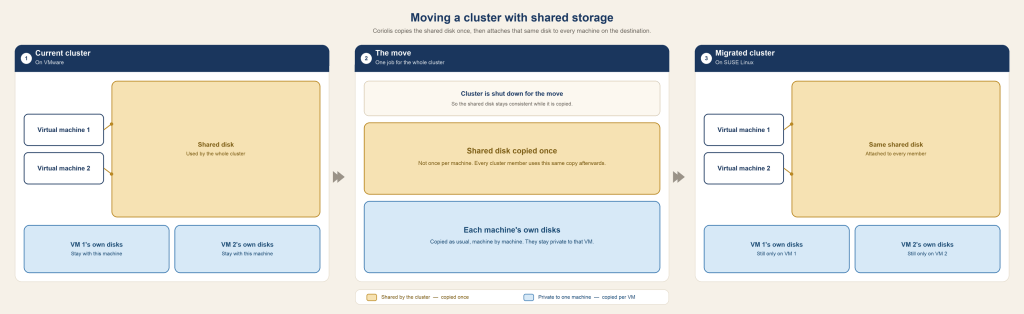
How it works
At a high level, a clustered shared-disk migration follows this sequence:
- Create a Replica or Migration that includes all VMs that share the disk(s) in one transfer. A transfer with multiple instances is treated as clustered.
- After collecting instance information for each selected VM, Coriolis assigns an owner instance for each shared disk (the first instance in the transfer that reports that disk).
- On the destination, only the owner creates the shared volume and receives the disk data. Other instances record a placeholder and skip data transfer for that disk.
- At deployment, every clustered guest that should see the disk gets the same destination volume attached (not a per-VM clone).
- Private (non-shared) disks continue to be created and replicated per instance as usual.
Creating a shared-disk transfer
Typical flow from the Coriolis Dashboard (or CLI):
- Ensure the source endpoint is VMware vSphere/ESXi and the destination endpoint is SUSE Linux.
- Source VMs must be powered off for the transfer to work.
- Create a new Replica/Migration and select all VMs that participate in the cluster (every guest that attaches the shared disk).
- Configure destination storage options so shared disks map to a Libvirt storage pool (see Limitations below).
- Keep Clone Disks disabled for deployments that include shared disks (see Limitations).
- Run the transfer. After a successful Replica execution, deploy with the same constraints.
NOTE! Do not split cluster members across separate transfers if they share a single destination volume.
Limitations and requirements
Source (VMware) – aligned with non-CBT disks
Shared disks and disks in Independent disk modes:
- Cannot use CBT / incremental sync: those disks transfer in full on every Transfer Execution.
- Require the source VM to be powered off: power off during the Transfer Execution so the export is consistent. Enable Shutdown Instances on the execution so Coriolis can shut clustered members down together (do not leave shared / Independent-disk guests powered on).
- Other disks on the same VM can still sync incrementally: the guest is still powered off for the run. That does not disable CBT: between executions VMware tracks changes, and the next cold run copies only those blocks for CBT-capable disks. Shared / Independent disks remain full copies every time.
Destination and clustered transfer (SUSE Linux KVM)
- Clone Disks option must be disabled: Deploying with Clone Disks enabled is not supported when the transfer includes shared disks.
- SUSE Linux storage pool required for shared disks: Shared disks must map to a volume backend that supports sharing (Libvirt storage pools). Mapping a shareable disk to unsupported backends (for example raw / controller passthrough) is rejected at validation.
- All cluster members in one transfer: shared-disk ownership and single replication require a multi-instance (clustered) transfer that includes every VM attaching that disk.
- Consistent storage mappings: all instances in the clustered transfer should resolve shared disks to the same destination storage pool/mapping, so non-owner guests can attach the volume the owner created.