
Migrating (CMaaS) from Stackit
Transfer Migrations from Stackit operate in the same way Transfer Replicas do and thus entail the same requirements and steps described below.
Replicating (DRaaS) from Stackit using Coriolis-based exports:
Requirements:
In the process of replicating from Stackit, Coriolis will clone locally the volumes of the source VM and boot a temporary worker VM on the source Stackit side to perform the actual disk exports.
Input: the ID or name of the instance to be replicated. The instance is expected to be booted from volume, an error will be raised if ephemeral root disks are used since these cannot be exported.
NOTE please consider reviewing the general steps recommended to be performed before creating and executing a replica of an instance from Stackit here.
Steps performed by Coriolis:
- read the configuration of the instance on the source Stackit (e.g. machine type information, disks, NICs)
- snapshot and clone the attached volumes
- create a temporary worker VM (the “disk export worker”) on the source Stackit and attach the volumes from step 2
- the temporary disk export worker VM will then determine the differences and export the contents of the attached volumes
After the above steps are completed, the contents of the disks will be transferred and written to disks on the destination via the destination cloud plugin. Only the changed data will be transferred to the destination cloud.
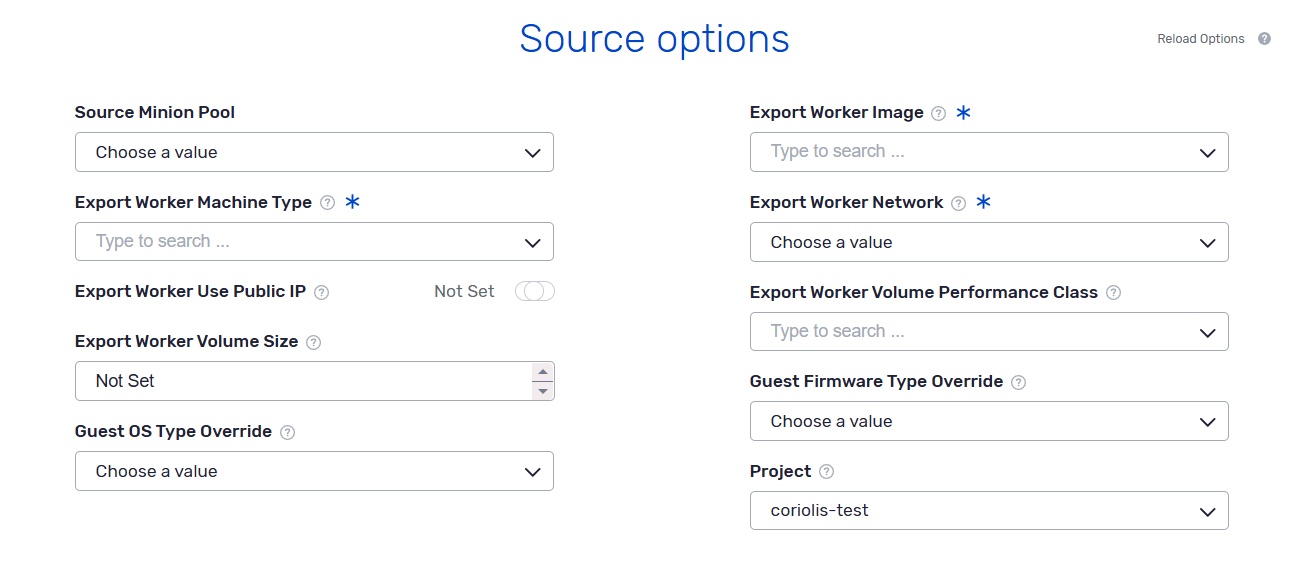
Stackit source environment parameters
The source environment parameters are a set of source-cloud-specific parameters that offer some extra options to the migration/replication process on a per-VM basis.
Below is a listing of the source environment parameters the Stackit plugin supports when migrating/replicating a VM from Stackit:
|
1 2 3 4 5 6 7 8 9 10 11 |
{ "guest_os_type_override": "linux", "guest_firmware_type_override": "EFI", "export_image": "Ubuntu 22.04", "export_network": "stackit-network", "export_machine_type": "g1.2", "export_worker_use_public_ip": true, "export_worker_volumes_size": 40, "export_worker_volume_performance_class": "storage_premium_perf2", "project": "stackit-source-project" } |
Each parameter represents:
- guest_os_type_override (string: linux or windows) — overrides the OS type Coriolis reads from source image or boot-volume metadata. Use this when Stackit metadata is missing or wrong; it affects listing, export info, and which destination OSMorphing tools/worker image are used.
- guest_firmware_type_override (string: BIOS or EFI) — overrides the firmware type Coriolis reads from source image or volume metadata (uefi). Use this when that metadata is missing or wrong; the destination uses it when creating the migrated server (including volume image config).
- export_image (string) — name or ID of a pre-existing Ubuntu image on the source Stackit side for the temporary disk-export worker. The image must be visible to the Coriolis endpoint project and have cloud-init installed and configured for first boot. Disk export always uses a Linux worker, including for Windows guests.
- export_network (string, required) — name or ID of an existing network for the temporary export worker NIC. If export_worker_use_public_ip is false, Coriolis must be able to route to this network.
- export_machine_type (string, required) — machine type for the temporary disk-export worker. Must be compatible with export_image.
- export_worker_use_public_ip (boolean, default true) — allocate a public IP for the temporary disk-export worker. If false, Coriolis must reach the worker on export_network.
- export_worker_volume_size (integer, min 1) — size in GB of the volume used to boot the temporary export worker. If omitted, Coriolis uses the image minimum size or the selected export_machine_type.
- export_worker_volume_performance_class (string) — volume performance class for the temporary export worker’s boot volume.
- project (string) — ID of the Stackit project from which to export VMs. If unset, the project of the service account from the Coriolis endpoint is used. Export workers and source minion pools must use the same project.
NOTE: The project option can only be populated and used if the endpoint service account has StackIt Organization level permissions to access all the projects in it.
The export worker is always created in the same availability zone as the source server. Created source minion pools must also be configured to use the same availabilizy zone as the migrated VMs. Servers booted from an ephemeral root disk (not from volume) cannot be exported, because Stackit does not expose those disk contents.
These source options can also be set in the [stackit_migration_provider] config section and overridden per migration/replica in the source environment.